
Use cases
Find weak creative before it costs you media budget
Agencies and brand teams use Creative Score to check ads before they go live: statics, stories, banners and video. Each ad gets a score out of 100, the reasons behind it and the changes to make first.
For agencies
Check every client ad before it goes live
The problem
Work goes to the client, comes back with notes and goes round again. A weak ad can reach the client, or go live, before anyone spots what is wrong.
How Creative Score helps
Each ad is scored out of 100 and shown in colour. Creative Score sets default colours for each score range, and you can change them to match your team’s or client’s standards. Agree a pass mark as an agency on top of that, and anything below it goes back to the designer with the list of fixes, before the client sees it. Upload the file from your designer, a freelancer or a generator and judge it on the same terms.
What you get
- A score out of 100 for every ad
- The reasoning behind it, across 200+ attributes in 10 categories
- The changes that matter most, in order
Attention heatmap

Overall score: 80 out of 100, rated Good
Score
Recommendations
- Enhance the visual prominence and contrast of the headline text to ensure it captures focus before viewers look down at the mockups. …
- Increase the visual presence of the brand signifier so brand awareness objectives are met directly from the first slide. …
- Strengthen the carousel navigation cues to encourage users to swipe through the remaining slides. …
For brand teams
Protect your media spend
The problem
Media budget is spent whether the creative is strong or weak. Problems found after launch cost money while you fix them.
How Creative Score helps
Score each ad before launch, against the objective you pick. A conversion ad is judged more on attention and the call to action; a brand ad more on memorability. Brand Settings help keep every ad on-brand, from statics to video.
What you get
- One standard for every ad, before budget goes behind it
- Eye-tracking heatmaps, from Attention to the Fog Map, showing what is likely to be seen and what is likely to be missed
Attention heatmap

Overall score: 74 out of 100, rated Good
Score
Recommendations
- Streamline the background composition by reducing the number of scattered elements to lower mental friction while keeping the FMCG context intact. …
- Position the sub-headline on a solid, high-contrast background area or add a subtle scrim behind the text to ensure effortless reading. …
- Group the contrasting statements closer together or create a unified visual hierarchy that guides the eye logically through the comparison. …
Paid social
Meta and Instagram ads, before you put budget behind them
The problem
If people miss the product, the brand or the call to action in the feed, the ad can’t do its job, however much budget is behind it.
How Creative Score helps
Upload the image (PNG, JPG, GIF, WEBP or BMP, up to 30 MB). Six eye-tracking heatmaps (Attention, Fog Map, AOI, Cognitive Demand, Clarity Map and Engagement Map) show what people are likely to look at first, where they look next and which areas they are likely to miss. The headline gets its own score, with example rewrites.
What you get
- Which visuals are weak, and what to change
- Eyetracking scores for Attention, Cognitive Demand, Clarity and Engagement
- Headline analysis with example rewrites
- The same check for product listing images, landing pages and emails
Attention heatmap

Overall score: 74 out of 100, rated Good
Score
Recommendations
- Add a prominent conversion-focused call-to-action button or banner to guide high-intent prospects toward the next step. …
- Streamline the layout by visually connecting the mobile ad preview directly to its analytical score output. …
- Boost the visual prominence and contrast of the brand name and website URL in the footer. …
Video
Video ads for TikTok, Reels and YouTube
The problem
Video takes the most work to change once it is finished, so problems are best found before the edit is signed off.
How Creative Score helps
Upload video files up to 30 MB and score them alongside your statics, against the same pass mark. Check YouTube thumbnails before you publish, too.
What you get
- A score out of 100 and the reasoning behind it
- The top changes to make before you put budget behind it
- Statics and video judged on the same terms
Attention heatmap

Overall score: 73 out of 100, rated Good
Score
Recommendations
- Simplify the layout by reducing secondary body text and toning down or removing background patterns behind the copy. …
- Make the carousel navigation prompt prominent and action-driven so users continue through the sequence. …
- Increase the scale and contrast of the brand mark, anchoring it clearly near the top or paired with the product benefit. …
Before you test
Pick the stronger variant before it goes into your test
The problem
Every version you test live takes a share of budget and time, including the weak ones.
How Creative Score helps
Score each version, then compare them side by side. See which one is stronger and why, then fix the weaker one or drop it. Creative Score doesn’t replace your live test; it helps you choose what goes into it.
What you get
- Versions of an asset compared side by side
- Scores weighted for the objective you choose
- Tags to search, filter and sort assets across projects
Slide 2, scored 57

Overall score: 57 out of 100, rated Average
Average
Attention 74, Cognitive Demand 44, Clarity 66, Engagement 44
Slide 3, scored 62

Overall score: 62 out of 100, rated Average
Average
Attention 61, Cognitive Demand 48, Clarity 78, Engagement 51
Workspaces and sign-off
Keep every client and brand apart, and hand-offs clear
The problem
When one team works on several clients or brands, settings get mixed up and feedback gets lost between the designer, the account lead and the client.
How Creative Score helps
Separate workspaces keep each client’s work apart, and Brand Settings keep every ad on-brand. Both come with every plan. Invite your team and freelancers to the same workspace. Anything below the pass mark your team agreed goes back with the list of fixes, so the designer knows what to change before the next review.
What you get
- A workspace for each client or brand
- Brand Settings for each workspace
- Every score shown in colour: the default colours, or your own
Our own ads, on the colour scale
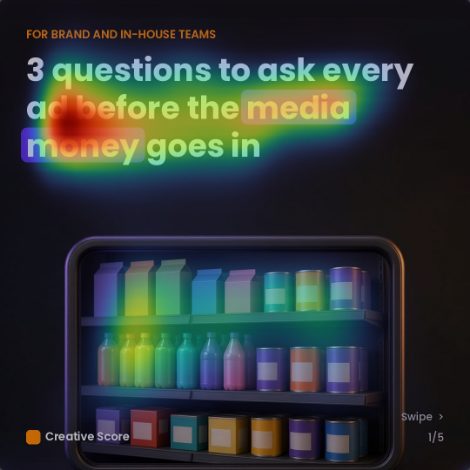
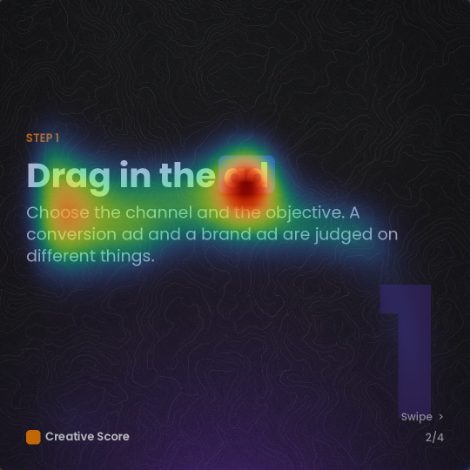

GoodAverageDefault colours for each score range; you can change them
What customers say
Reviews posted publicly on AppSumo by Creative Score users, quoted word for word.
“The analyses we've gotten have been surprisingly nuanced and thorough -- even when we deliberately provided vague instructions. Just as importantly, the results provided in the Creative Score report are transparent and clear --> Providing detailed reasoning for every conclusion reached.”
“So when I'm going through the feedback Creative Score's giving me, it's a way of ensuring that I've checked off all of the important items necessary for a really high-performing ad.”
“…it can really help me with seeing some blindspots and provide additional value to my clients. I will also from now on run all our landing page designs with this tool.”
Good to know
- Most analyses take a couple of minutes.
- Upload images, PDFs and video files up to 30 MB. Multi-page PDFs are scored page by page.
- You can score an asset at any stage, including during a live campaign.
- A high score means the asset follows patterns that research links to stronger results.
Score the ad before you buy the media.
Upload an ad and get a score out of 100, the reasons behind it, and the five changes that will move it most.